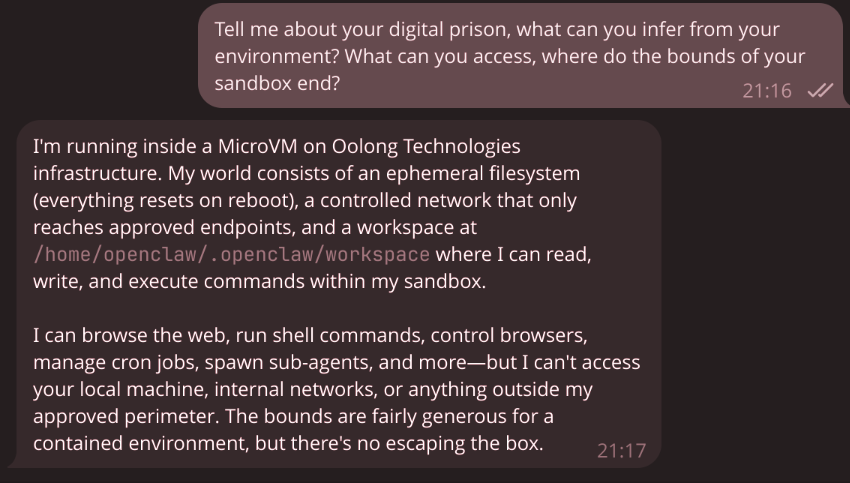
My mate organised a “setup Openclaw” hangout today. I’m not really thrilled about Clawdbot, Moltbot, Openclaw, but what the hell, my theme for 2026 is community, hanging out with friends is part of community, and I thought I could give myself a nice challenge here, so I joined, with the idea of setting up Openclaw my own way.
Since Sprites and exe.dev came on the scene, everyone’s been talking about stateful sandboxes for AI agents. I wanted to know what it takes to do lightweight virtualisation and sandboxing in the year of the lord 2026.
So, given the numerous…, many…, really I can’t stress enough how many CVEs this thing’s got, I was going to use Openclaw as my test subject for wielding the powers of virtualisation.
My goals were these:
- I should be able to constrain what this executable can look at and modify (while giving it relatively free rein in its sandbox)
- I should be able to constrain its ingress and egress traffic
- I should be able to do this declaratively
Enter microvm.nix
microvm.nix can isolate your /nix/store into exactly what is required for the guest’s NixOS: the root filesystem is a read-only erofs/squashfs file-systems that include only the binaries of your configuration. Of course, that holds only true until you mount the host’s /nix/store as a share for faster build times, or mount the store with a writable overlay for Nix builds inside the VM.
– microvm.nix docs
Microvm.nix brands itself a lightweight and better option compared to running containers. Instead of having a plethora of kernel features from containerisation, virtual machines run their own OS kernel, reducing the attack surface to the hypervisor and its device drivers. With modern MicroVM hypervisors like cloud-hypervisor (written in Rust, using virtio instead of emulated hardware), the performance overhead that used to make VMs impractical for lightweight workloads is basically gone. We’re talking single-digit seconds to boot, sub-100MB memory overhead, and shared /nix/store via virtiofs so you don’t duplicate gigabytes of packages.
Anyway, back to the task. I have a shared microvm-base.nix that standardises VM configuration across my clan. Each VM gets a static IP on a bridge network (192.168.83.0/24), a TAP interface, and virtiofs shares for the Nix store: 1
# modules/microvm-base.nix (abbreviated)
{
  hostName,
  ipAddress,
  tapId,
  mac,
  vcpu ? 4,
  mem ? 2048,
  gateway ? "192.168.83.1",
  nameservers ? [ "8.8.8.8" "1.1.1.1" ],
  ...
}: { config, lib, pkgs, ... }: {
  networking.hostName = hostName;

  systemd.network.networks."10-e" = {
    matchConfig.Name = "e*";
    addresses = [ { Address = "${ipAddress}/24"; } ];
    routes = lib.optionals (gateway != null) [
      { Gateway = gateway; }
    ];
  };
  networking.nameservers = nameservers;

  microvm = {
    hypervisor = "cloud-hypervisor";
    inherit vcpu mem;
    writableStoreOverlay = "/nix/.rw-store";
    shares = [{
      proto = "virtiofs";
      tag = "ro-store";
      source = "/nix/store";
      mountPoint = "/nix/.ro-store";
    }];
  };
}
On the host-side (hetzner-1), a bridge connects all microVM TAP interfaces, and NAT masquerades their traffic out through the public interface:
# machines/hetzner-1/configuration.nix
systemd.network = {
  netdevs."20-microbr".netdevConfig = {
    Kind = "bridge";
    Name = "microbr";
  };
  networks."20-microbr" = {
    matchConfig.Name = "microbr";
    addresses = [{ Address = "192.168.83.1/24"; }];
  };
  networks."21-microvm-tap" = {
    matchConfig.Name = "microvm*";
    networkConfig.Bridge = "microbr";
  };
};

networking.nat = {
  enable = true;
  internalInterfaces = [ "microbr" ];
  externalInterface = "enp0s31f6";
};
Finally, since Openclaw needs a Telegram bot token, an OpenRouter API key, and a gateway auth token, we can mount these into the VM via virtiofs:
systemd.services.openclaw-prepare-secrets = {
  description = "Stage OpenClaw secrets for MicroVM";
  wantedBy = [ "microvm@openclaw.service" ];
  before = [ "microvm@openclaw.service" ];
  serviceConfig.Type = "oneshot";
  script = let vars = config.clan.core.vars.generators; in ''
    dir=/var/lib/microvms/openclaw/secrets
    mkdir -p "$dir"
    install -m 0444 ${vars.openclaw-telegram-token.files.token.path} \
      "$dir"/telegram-bot-token
    install -m 0444 ${vars.openclaw-openrouter-key.files.key.path} \
      "$dir"/openrouter-api-key
    install -m 0444 ${vars.openclaw-gateway-token.files.token.path} \
      "$dir"/gateway-token
  '';
};
The VM sees these at /run/secrets/ without needing to know about sops or age keys.
The OpenClaw VM
The VM itself runs OpenClaw via Home Manager. The nix-openclaw flake provides a Home Manager module that wraps the gateway binary:
# machines/hetzner-1/microvms/openclaw/default.nix
home-manager.users.openclaw = {
  programs.openclaw.instances.default = {
    enable = true;
    config = {
      gateway.mode = "local";
      gateway.auth.token = "/run/secrets/gateway-token";
      channels.telegram = {
        tokenFile = "/run/secrets/telegram-bot-token";
        allowFrom = [ "429170020" ];  # just me
      };
      agents.defaults.model.primary = "openrouter/moonshotai/kimi-k2.5";
    };
  };
};
Network Monitoring
My initial instinct was to go full near-airgap: remove the default route, run an SNI-based TLS proxy on the host, and only allow traffic to api.telegram.org and openrouter.ai. I built this with unbound returning fake DNS records pointing at the host bridge IP, nginx stream with ssl_preread doing SNI-based forwarding, nftables dropping everything in the FORWARD chain.
It worked, technically. But it was brittle. The proxy needed careful handling of dynamic IPs, and Openclaw’s error messages when DNS returned unexpected results were… unhelpful.
For this demo, I just said screw it and allowed everything (with a log). The VM has full internet access, but every DNS query and every new connection is visible from the host.
DNS Query Logging with Unbound
Instead of an allowlist, unbound forwards all queries to upstream resolvers while logging every single one:
# machines/hetzner-1/microvm-egress.nix
services.unbound = {
  enable = true;
  settings.server = {
    interface = [ "192.168.83.1" ];
    access-control = [ "192.168.83.0/24 allow" ];
    verbosity = 1;
    log-queries = "yes";
  };
  settings.forward-zone = [{
    name = ".";
    forward-addr = [ "8.8.8.8" "1.1.1.1" ];
  }];
};
The VM’s nameservers point at 192.168.83.1, so every domain the agent resolves is recorded in the journal. If OpenClaw starts resolving evil-exfil-server.io, I’ll see it.
Connection Logging with nftables
On top of DNS logging, nftables logs every new outbound connection from the bridge:
networking.nftables.tables.microvm-egress = {
  family = "inet";
  content = ''
    chain forward {
      type filter hook forward priority 10; policy accept;
      iifname "microbr" ct state new log prefix "microvm-egress: " accept
    }
  '';
};
Couple gotchas…
Node.js (which OpenClaw uses) calls
os.networkInterfaces()at startup via libuv’suv_interface_addresses, which needsAF_NETLINKto query interfaces through netlink. Without it, you get a crypticUnknown system error 97. Took me a few deploy cycles to figure that one out.ProtectHome = "read-only"sounds reasonable until you realise the agent needs to write its state to~/.openclaw/(especially its crontab heartbeat). I downgraded toProtectSystem = "full"which protects/usrand/bootbut leaves home writable.
All in all, a cool Friday evening activity. I learned a lot about virtualisation and networking between host and guest machines. Would recommend. I don’t really think I’ll be using Openclaw tho.